
Quick Start
Welcome to Poker Toolkit! This guide will help you get started with the application in 5 minutes and begin progressing immediately.
Process Overview
Here are the steps you'll follow:
- Create your account (Google or email)
- Accept the Terms of Service (if necessary)
- Choose your plan
- Discover Coaching (your personal AI assistant)
- Launch your first action (mental profile or ranges)
- Explore the features
Estimated time: 5 minutes ⏱️
Step 1: Create Your Account
Access the Login Page
Go to poker-toolkit.com and click the "Sign In" button in the top right corner.
Available Languages
- 🇫🇷 French version: poker-toolkit.com/fr
- 🇬🇧 English version: poker-toolkit.com/en
Choose Your Sign-Up Method
You have two options to create your account:
Option 1: Sign in with Google (recommended)
- Click "Sign in with Google"
- Select your Google account in the popup
- Authorize Poker Toolkit to access your email
- You're automatically logged in!
Advantages:
- ✅ One-click sign-up
- ✅ No password to remember
- ✅ Ultra-fast login every time
Option 2: Sign in with Email
- Enter your email address in the field provided
- Click "Send login link"
- Check your inbox (check your spam if necessary)
- Click the magic link received (valid for 1 hour)
- You're logged in!
Advantages:
- ✅ No Google account needed
- ✅ Secure passwordless login
- ✅ Link valid for 1 hour
No Password
Poker Toolkit uses a passwordless login system for more security and simplicity. You never manage passwords!
Step 2: Accept the Terms of Service
After your first login (or if the Terms have been updated), you must accept the Terms of Service to continue.
Why This Step?
The Terms of Service define the rules of use for the application, your rights, and our responsibilities. They are necessary to use Poker Toolkit legally and securely.
Step 3: Choose Your Plan
After accepting the Terms of Service, you arrive on the plan selection page with three subscription options.
The Three Plans:
Ranges Builder (16€/year)
For range editing and strategy browsing:
- Unlimited ranges and folders
- Range editor + full strategy browsing
- 10 spaced-repetition reviews per day
- No AI coaching, no concept analysis
Monthly (6€/month)
Full access, no commitment, cancel anytime. Includes 100 AI credits per month for coaching and concept analysis.
Yearly (48€/year, ~4€/month, -33%)
Same as Monthly, billed annually. Best value for committed users.
Action: Choose your plan on the Subscription page.
Learn more about the subscription →
Step 4: Discover Coaching
Once your plan is chosen, you automatically arrive on the Coaching page: your personal assistant.
What is Coaching?
Coaching is an AI assistant powered by Claude that accompanies you 24/7 in your poker progression.
What it does for you:
- 🤖 Answers all your questions about poker, ranges, mental game, strategy
- 🎯 Helps you create your ranges, define your goals, identify your leaks
- 📊 Organizes your sessions and gives you personalized recommendations
- 🗂️ Displays visual elements (grids, goals, leaks) directly in the conversation
- ⚡ Inline actions: click buttons in responses to navigate instantly
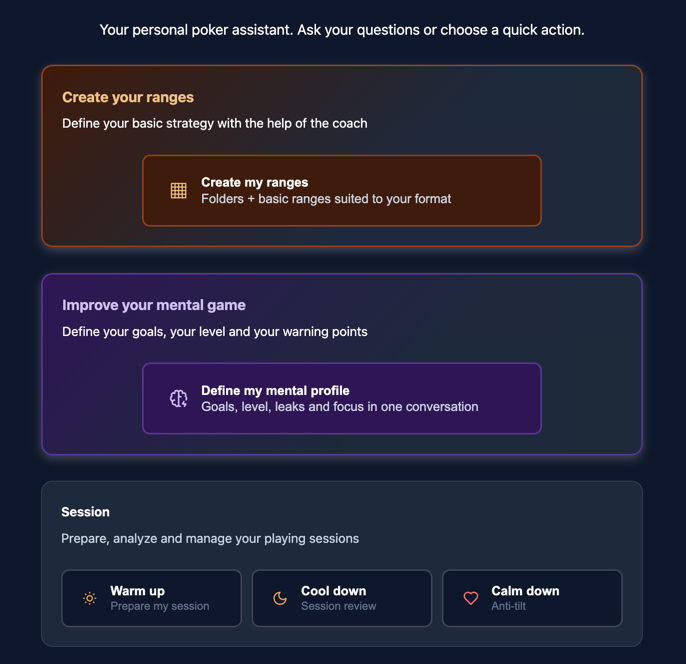
Coaching Page Interface
When you arrive on the page, you see:
- Conversation history (empty for now)
- Remaining AI credits (credit balance display)
- Central chat area
- Quick prompts (pre-written quick actions) to get started easily
Step 5: Launch Your First Action
To get started, Coaching offers you quick prompts (quick actions) to structure your progression. Choose one of the two main actions:
Option A: Create Your Ranges 🎯
Quick prompt: "Create my ranges"
What happens:
- Click the "Create my ranges" button
- The coach asks you a few questions:
- ❓ What format do you play? (Cash game / Tournament / Sit'n'Go)
- ❓ How many players at the table? (6-max / 9-max)
- ❓ What's your playing style? (Tight / Neutral / Aggressive)
- The coach then creates your range structure:
- 📁 Folder per position (UTG, MP, CO, BTN, SB, BB)
- 📄 Preflop range grids adapted to your format
- 🎨 Pre-filled ranges with recommended combos
Estimated time: 3-5 minutes Perfect for: Players who want content to memorize immediately
AI Credits
Custom range generation uses AI credits. Trial: 25 one-time coaching credits. Subscription: 100 credits/month.
Option B: Define Your Mental Profile 🧠
Quick prompt: "Define my mental profile"
What happens:
- Click the "Define my mental profile" button
- The coach guides you step by step to:
- ✅ Set your first goal (high goal + low goal + steps)
- ✅ Define your A/B/C Game levels (best game, average game, worst game)
- ✅ Identify your focus conditions (10 questions on concentration)
- ✅ Note your first mental leaks (recurring errors to correct)
Estimated time: 5-10 minutes Perfect for: Players who want to structure their mental progression
Tip
If you're just starting out, begin with "Create my ranges" to have content to work on immediately. Then come back to Coaching to define your mental profile.
Other Available Quick Prompts
Once you're comfortable, explore the other quick actions:
- 🌅 Warm up: Prepare a session (check goals, focus, leaks to watch)
- 🌙 Cool down: Review after a session
- 😤 Calm down: Manage tilt with a breathing exercise then update mental profile
Step 6: Explore Other Features
Now that you've launched your first action with the coach, here are the main features to discover:
🎯 Ranges (Editor and Learning)
Navigate to Menu → Strategy to:
- See your ranges created by the coach (or create your own manually)
- Edit a range: click on a grid to open and customize it
- Learn Mode: test your knowledge with a combo quiz
- Draw Mode: draw the range from memory to anchor memorization
🧠 Mental (Mental Game Management)
Navigate to Menu → Mental to:
- Bankroll Management: Find your target in buy-ins and enter your bankroll
- Goals: View and modify your goals
- Focus: Access the 10 concentration questions
- Levels: See your defined A/B/C Game levels
- Leaks: Track your mental leaks and correct them
📊 Analysis (Equity Calculation)
Navigate to Menu → Analysis to:
- Equity Calculator: Compare 2 to 6 ranges simultaneously on a given board
- Guess the Equity: Gamified quiz to train your mental equity estimation
Quick example:
- Go to Equity Calculator
- Range 1:
AKs(text notation) - Range 2:
QQ(text notation) - Click "Calculate"
- Result: AKs has ~43% equity, QQ has ~57%
Navigating the Application
Main Menu
The main menu displays 4 sections:
- 🎯 Ranges (editor and learning)
- 🧠 Mental (bankroll, goals, focus, levels, leaks)
- 📊 Analysis (equity and guess the equity)
- 🎮 Session (session management)
On desktop: the menu is at the top of the screen. On mobile: the menu is at the bottom of the screen.
Submenus
Once in a section (Mental or Analysis), a submenu appears:
- On desktop: on the left of the screen
- On mobile: at the top via a dropdown list
Accessing Coaching
Coaching is accessible in two ways:
- Click on the Poker Toolkit logo at the top
- Click on the floating bubble (brain icon) in the bottom right, visible on all pages
Other Links
- 👤 User (in menu): manage your account (deletion, plan change)
- 👑 Subscription (in menu): manage your subscription
- 📚 Documentation: accessible via the book icon in menu or in footer
- 📝 Changelog: available in footer
Next Steps
Congratulations! 🎉 You've completed the quick start and are ready to progress with Poker Toolkit.
To Go Further:
📚 Deepen Your Knowledge
- What is Poker Toolkit? - Complete overview of the application
- Detailed Coaching - All AI coach capabilities
- Detailed Ranges - Edit, learn, draw modes explained
- Detailed Mental - BRM, goals, focus, levels, leaks in depth
- Detailed Analysis - Equity calculator and guess the equity
🎯 Recommended Actions
If you chose "Define my mental profile":
- ✅ Finalize your first goal with the coach
- ✅ Go to Menu → Mental → Bankroll to find your bankroll target
- ✅ Create your ranges with the coach (quick prompt "Create my ranges")
- ✅ Test Learn Mode on a range to start memorizing
If you chose "Create my ranges":
- ✅ Go to Menu → Strategy to see your created ranges
- ✅ Open a range and customize it if needed
- ✅ Launch Learn Mode to test your knowledge
- ✅ Define your mental profile with the coach (quick prompt "Define my mental profile")
💡 Progression Tip
Good to Know
Each Poker Toolkit feature is fully usable directly, without going through the coach. Coaching is an optional guide if you need assistance.
Coaching can help if you don't know where to start:
- 🤖 Ask the coach your questions to be guided
- 🎯 Ask the coach to guide you to the right features
- 📊 Use quick prompts for your sessions (warmup, cooldown, calmdown)
- 🧠 Get accompanied to structure your progression
Example questions to ask the coach:
- "How should I organize my playing sessions to progress faster?"
- "What are the most common mental leaks and how do I correct them?"
- "Help me create an open range from UTG at 100bb 6-max"
- "How do I know if I should stop playing (C-Game)?"
Need Help?
If you have questions or encounter problems:
- 📖 FAQ - Answers to frequently asked questions
- 📝 Glossary - Poker and Poker Toolkit vocabulary
- 💬 Support - Contact us directly
- 🤖 Coaching - Ask your question to the AI coach!
- 💜 Discord - Join the community
Tip
The AI Coaching is your best ally for progress. Don't limit yourself to quick prompts: ask it all your questions, no matter how simple or complex. That's what it's there for! 🚀
Good luck and happy progressing with Poker Toolkit! 🎴