
Learning Mode
Learning mode allows you to memorize your ranges through an interactive review system based on quizzes. Unlike simple passive reading, this mode forces your brain to actively retrieve information, which significantly improves long-term memory retention.
Why Use Learning Mode?
- Active memorization: You must find the range for each hand, which reinforces memory anchoring
- Focus on edge cases: The system automatically identifies "border combos" that are the most difficult to remember
- Immediate feedback: Instantly see your mistakes with a side-by-side visual comparison
- One grid at a time: Work on exactly the grid you want to review
How Does It Work?
General Principle
Learning mode presents you with poker hands (for example AK suited, QQ, 76 offsuited) and asks you to answer with your grid's own actions (one per range, plus Fold), before showing you the whole range. Unlike a classic quiz that would test all 1326 possible combinations, Poker Toolkit uses an intelligent algorithm that focuses on border combos: hands located within ranges, at the boundary between two ranges, or just outside a range.
Border Combos: Why Is It Effective?
Border combos are the most difficult hands to memorize because they are the ones where we hesitate the most. For example:
- If your UTG range contains QQ+ and AK, the border combos will be: JJ (just below QQ), AQ (just below AK)
- These hands are the most likely to be confused or forgotten
The algorithm automatically extracts these border combos from all your ranges, eliminates equivalent duplicates (AKs/AKo are tested separately), then randomly shuffles them to create your quiz.
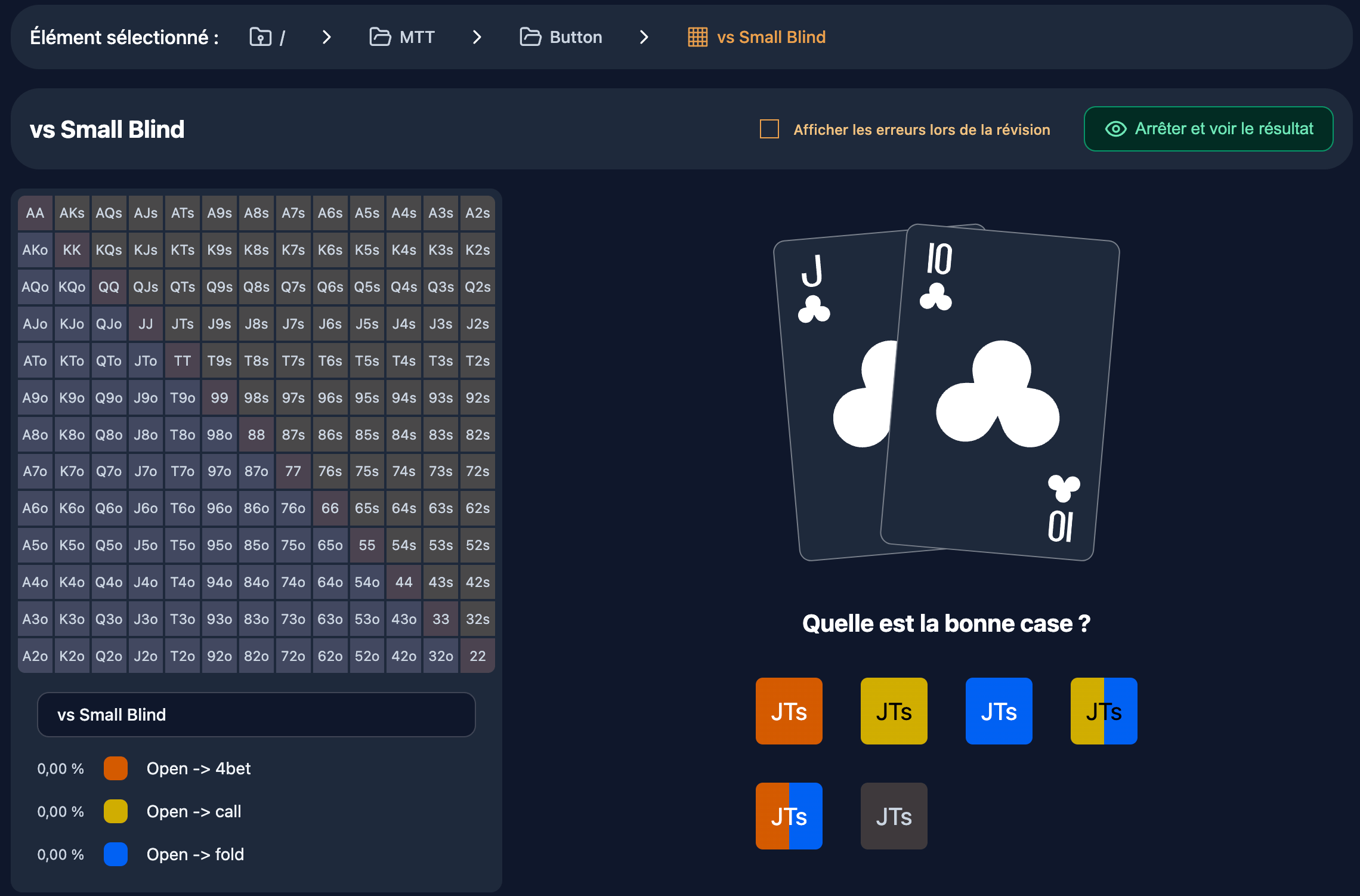
The Interface
One hand, three beats
- The hand: the two cards show, with the table when the grid carries position tags (seats, button, stacks, opponent's action).
- Your answer: one button per range of the grid, with its name and colour (for example Raise, Call), plus Fold. On a keyboard, keys 1, 2, 3… match the buttons in order (Fold is last).
- The reveal: the verdict quotes your range ("Your range says: Raise"), then the whole grid shows with the hand you played outlined. On phones, a zoom on the cells around the hand shows above the grid.
At the top of the run, After each hand lets you choose (your choice is remembered on this device):
- Show the grid (default): the verdict and the whole grid stay on screen until you click Next hand (or Space / Enter). Take the time to check.
- Result only: the verdict alone, without the grid. The button counts down: Next hand in 3 s, 2 s… then the next hand comes. Click it (or Space / Enter) to skip the wait.
It is the same flow as Situations, on a single grid.
How an answer is judged
- An action played at least 50 % of the time with this hand is correct; Fold counts for what is in no range.
- An action played less than 50 % of the time (but not 0) is accepted and marked mixed.
- A hand in no range is folded 100 % of the time: Fold is correct.
Validation and Feedback
During the Quiz
The "Stop and see result" button is always available if you want to end the quiz early.
After the Quiz
Once all questions are answered (or if you stop manually), you access the results view:
- Score: "{number} correct answers out of {total}"
- Your mistakes (N): every hand you missed with its cards and your answer → the expected action (nothing when you made no mistake)
- The grid with the hands played outlined: green when your answer was right, red otherwise; Show the hands lists them (cards, your answer, the expected action)
Score and History
Score Calculation
The score is calculated by going through all 169 cells of the 13×13 grid:
- Correct combo: your range matches the expected range → +1 correct answer
- Incorrect combo: your range doesn't match → +1 wrong answer
- Unanswered combo: ignored (doesn't count in the total)
Formula: Score = {correct} correct answers out of {correct + wrong}
Session Recording
Each review session is automatically recorded in Firebase with:
- Date and time: session timestamp
- Grid ID and name: reviewed grid (name at time of learning)
- Expected ranges: snapshot of correct ranges at that moment
- Your answers: snapshot of your selected ranges
- Score: number of correct and wrong answers
This history allows you to:
- Track your progress over time
- Identify grids that need more review
- Compare your performance between different sessions
Note: Currently, there is no dedicated interface to view the complete session history. The data is stored but display is planned for a future version.
Access
From a grid: in the grid editor, click Review in the grid actions (or pick Review in a grid's menu in the explorer).
How it works:
- The algorithm extracts the border combos from all the ranges of this grid
- The combos are shuffled randomly
- The quiz starts with the first combo
- At the end, Back to edit mode takes you back to the grid
Learning mode works on one grid at a time. To play hands from several grids in a row (your whole program, a situation, a tournament stage), use Situations or a sequence.
Learning mode requires a Monthly or Yearly subscription.
Special cases:
- If the grid contains no combos to learn: an alert message is displayed
Concrete Use Cases
1. Memorizing a UTG Preflop Range
Context: You created a "UTG Open 100bb" grid with ranges: Open, 3-bet, Fold.
Process:
- Open the grid in the editor
- Click Review
- The system generates questions on your range combos, including border combos (boundaries)
- You answer questions: "AA → Open", "JJ → Open", "T9s → Fold"
- Result: 8/10 correct answers
- You identify your mistake: you put T9s in Fold instead of Open
Benefit: You now know that you hesitate on medium suited connectors in this position.
2. Reviewing All Preflop Ranges Before a Tournament
Context: You have an "MTT Preflop" folder containing 6 grids (UTG, MP, CO, BTN, SB, BB), tagged by position.
Process:
- Open the Learn Today page and pick Situations
- Start a 20-hand run: hands are drawn from every grid of your program, key hands first
- At the end, Your mistakes and the per-grid results show you where you went wrong
Benefit: A complete review of all your ranges in one session, at the table.
3. Identifying Leaks with the Reveal
Context: You're not sure you know your BTN 3-bet vs CO range well.
Process:
- Start learning this grid
- Answer each hand with the grid's actions
- After each answer, the whole grid shows with the hand outlined
- You notice that you systematically put AJ suited in 3-bet when it's in Call
Benefit: You see the edge of the range right after each mistake, and correct it immediately.
Related Pages
- Grid editor: create and edit your ranges before learning them
- Grid explorer: organize your grids into folders
- Draw mode: another review mode based on free drawing
- Introduction to ranges: overview of the ranges system
Usage Tips
- Review regularly: spaced repetition is the key to long-term memorization
- Look at the reveal after each hand, especially on hands marked mixed: that is where the bottom of your range lies
- Focus on the score: a score below 80% indicates that you still need to review this grid
- Analyze your mistakes in the results view to identify confusion patterns
Learning mode is the ideal tool to transform your theoretical ranges into automatic reflexes at the table. Use it regularly to anchor your strategies in memory and gain confidence in your decisions.