
Ranges
Create, organize, and memorize your preflop ranges with powerful visual tools. Ranges are one of the pillars of Poker Toolkit: they allow you to structure your preflop decisions and anchor them in your memory through interactive learning modes.
Why Use Ranges in Poker Toolkit?
Preflop ranges are the foundation of your poker strategy: knowing which hands to play based on your position, stack, and action before you is essential to winning. But memorizing them is difficult without proper tools. For a complete introduction to range concepts, check out our poker ranges charts guide.
Poker Toolkit helps you:
- ✅ Create your ranges visually (13×13 grid) or in text (poker notation)
- ✅ Organize your ranges in folders by position, format, stack
- ✅ Actively memorize with quizzes and drawing exercises
- ✅ Import preset ranges (MTT path (discovery), Structured MTT, Cash game ranges to adapt, Expresso ranges to adapt, Push or Fold)
- ✅ Export and share your ranges with other players
Result: You play your ranges correctly in sessions, without hesitation, and improve faster.
The 3 Components of Ranges
1. 📁 Explorer (Organization)
The Explorer is your range library. You organize your grids into folders and subfolders to quickly find the right range for any situation.
What you can do:
- Create folders: By position (UTG, BTN, BB), by format (Cash, MTT, Expresso), by stack (60–100bb, 25–40bb, 15–25bb)
- Create grids: Each grid contains one or more ranges (example: "Open", "Call", "4bet")
- Organize hierarchically: Folders within folders, grids within folders
- Move, duplicate, rename: Complete file management
- Import presets: MTT path (discovery), Structured MTT, Cash game ranges to adapt, Expresso ranges to adapt, Push or Fold
Typical structure:
📁 Cash Game 6-max 100bb
  ├── 📁 UTG
  │   ├── 📄 Open
  │   ├── 📄 vs MP
  │   ├── 📄 vs CO
  │   ├── 📄 vs BTN
  │   ├── 📄 vs SB
  │   └── 📄 vs BB
  ├── 📁 Button
  │   ├── 📄 Open
  │   ├── 📄 vs SB
  │   └── 📄 vs BB
  └── 📁 Big Blind
      ├── 📄 vs UTG
      ├── 📄 vs MP
      ├── 📄 vs CO
      ├── 📄 vs BTN
      └── 📄 vs SB
Learn more about the Explorer →
2. ✏️ Editor (Creation and Modification)
The Editor allows you to create and modify your ranges in two ways: visual (13×13 grid) or textual (poker notation).
Visual Editing (13×13 Grid)
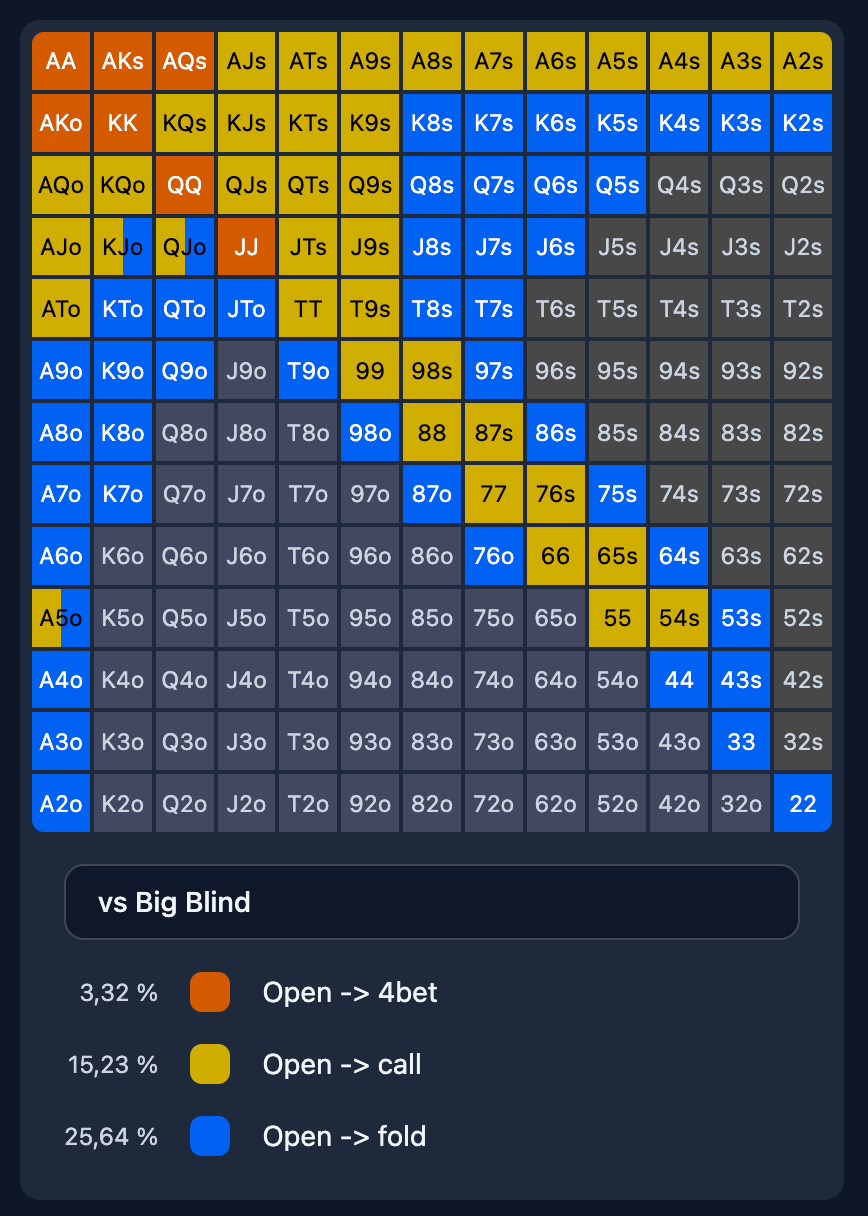
The 13×13 grid represents all possible poker hands:
- 169 cells: Each cell = one hand type (AA, AKs, AKo, KQo, etc.)
- 1326 combos: Total possible combinations
- Click on cells to add/remove hands from your range
Grid organization:
- Diagonal: Pairs (AA, KK, QQ... 22)
- Above the diagonal: Suited hands (AKs, QJs, T9s...)
- Below the diagonal: Offsuit hands (AKo, QJo, T9o...)
Text Editing (Poker Notation)
Prefer text? Use poker notation to edit your ranges quickly:
Notation examples:
AA, KK, QQ+→ Pairs QQ and higher (QQ, KK, AA)AKs, AQs, AJs→ Specific suited handsAKo, AQo+→ AQ offsuit and higher (AQo, AKo)22-77→ Pairs from 22 to 77AJ-AT→ All A-X hands from AJ to AT (AJs, AJo, ATs, ATo, etc.)
Weights (frequencies):
AA@50→ Play AA 50% of the timeAKs@75, QQ@25→ AKs 75%, QQ 25%- Default: 100% if no weight specified
Color and Name System
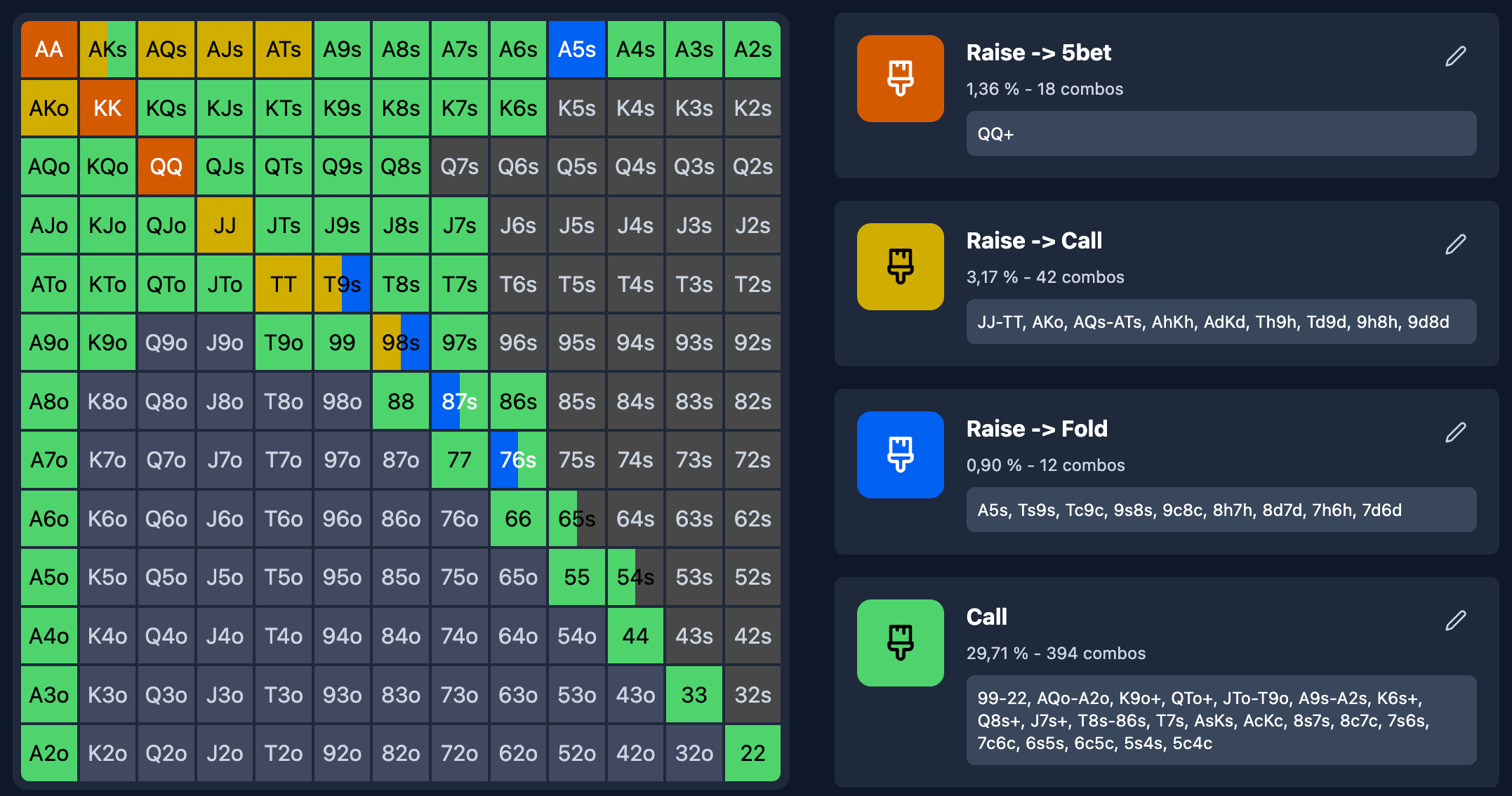
Each range in a grid has:
- A name: "Open", "Call", "4bet", etc.
- A background color: To visualize combos on the grid
- A text color: For readability
Favorite captions: You can save color+name combinations to reuse them easily:
- Automatic linking: Modifying a caption updates all ranges using it
3. 🎓 Learning (Memorization)
Learning includes two complementary modes to memorize your ranges effectively.
Learn Mode (Quiz)
Learn Mode is a quiz that asks you questions about your ranges to test your knowledge.
How it works:
- Select a grid or an entire folder to learn
- The system generates random questions:
- "With AKs, what do I do?" → Choices: Open / Call / 4bet / Fold
- Questions focus on border combos (critical hands at the edge of your range)
- Choose your answer from 2-4 options
- Immediate feedback: Correct or incorrect
- Final score: X/Y correct questions
Smart questions:
- Generated from your actual ranges
- Focus on border combos (borderline hands)
- Realistic answer options (no obvious fakes)
Draw Mode (Drawing)
Draw Mode is an active practice exercise: you must draw your range from memory on a blank grid.
How it works:
- Select a grid to draw
- The grid appears grayed out (optional visual reference)
- Draw your range by clicking on cells:
- Select the range to draw (Open, Call, 4bet...)
- Click on the combos you think should be included
- Automatic comparison: The system compares your drawing with the expected range
- Accuracy score: % of correctly placed combos
Visual feedback:
- Green: Correct combo (well placed)
- Red: Incorrect combo (misplaced or forgotten)
- Gray: Combo not drawn
Benefits of drawing:
- Active memory: You force your brain to reconstruct the range
- Visual anchoring: You better visualize the shape of your range
- Gap detection: You immediately see what you forgot
Grid and Folder Organization
Hierarchical Structure
Ranges in Poker Toolkit are organized like a file system:
- Folders: Contain grids and other folders (recursive structure)
- Grids: Contain one or more ranges (example: Open, Call, 4bet in the same grid)
- Root: Root folder (highest level)
Navigation:
- Breadcrumb trail: Root > Folder1 > Subfolder
- Click on a folder to see its contents
- Click on a grid to edit it
File Metadata
Each grid and folder has:
- Name: Display name (example: "Open UTG 100bb")
- Dates: Creation, last modification
- Order: Manual sorting via drag-and-drop
- Parent: Folder containing this file
- Note: Free text to document the grid (example: "Exploitative range vs tight player")
File Management
Available operations:
- Create: New folder or grid
- Rename: Change the name
- Move: Change parent folder
- Duplicate: Copy (with " (Copy)" suffix)
- Delete: Soft-delete (recoverable for 30 days)
Import and Export
Import Presets
Poker Toolkit includes pre-made ranges ready to use:
- Push or Fold 10% Ante 🔒: Push/fold charts for tournaments with ante
- Push or Fold 0% Ante 🔒: Push/fold charts without ante
- Cash game ranges to adapt: 100 10-max cash game ranges, a base to adapt to your game
- Expresso ranges to adapt: Ranges adapted for Expresso and Spin & Go
- MTT path (discovery): the "Early stage" block of Structured MTT (100 10-max grids), with 11 concepts and 94 review cards to start the MTT path
- Structured MTT 🔒: 1,300 ranges by tournament stage and stack, with 32 concepts and 280 review cards
The Structured MTT pack (Ranges Builder)
For tournament players, the Structured MTT pack (🔒 Ranges Builder or full plan) covers the whole tournament stage by stage and stack by stack, villain by villain (1,300 grids):
📁 Structured MTT
├── 📁 1. Early stage             (60–100bb, no stack size)
├── 📁 2. Middle stage
│   ├── 📁 40–60bb
│   ├── 📁 25–40bb
│   └── 📁 15–25bb
├── 📁 3. Bubble                  (same 3 stacks)
├── 📁 4. ITM                     (same 3 stacks)
└── 📁 5. Late stage (ICM)        (same 3 stacks)
Every stack folder holds the 10 seats, with the open, one grid against each opener and one against a 3bet from each later seat. At 15–25bb a raise commits the stack: open or All-in, 3bet All-in or call, Open -> All-in or fold. Below 15bb the pack gives no ranges: short-stack play depends too much on the structure, the antes and the stacks at your table.
The pack comes with the Concepts MTT folder: 32 concepts (poker basics, each stage of the tournament, bonus) and 280 review cards (French content), read in order through your MTT path; each grid's note links the concepts to read. They are base content to get started fast and to adapt to your tournaments (structure, field, payouts).
MTT path (discovery), Cash game ranges to adapt and Expresso ranges to adapt are free; Structured MTT and Push or Fold (🔒) require a Ranges Builder plan or a full plan.
How to import:
- In Strategy, click Import grids
- In the gallery, open a pack ("Structured MTT" on top): you first see its structure (its folder tree, a base to adapt) and a small example grid. Click Import, the large button always shown at the bottom of the pack, (or Unlock Ranges Builder when it needs a plan): the dialog closes at once
- The import runs on our servers (the button reads "Import in progress…"): you can keep using the app, and even close it
- When it is ready, the pack's folder (for example "Cash game ranges to adapt") opens, or a "Your … pack is ready" message offers View. After an MTT import (MTT path (discovery) or Structured MTT), your MTT path opens instead
- You can then edit them freely
From the Strategy first steps, the same gallery is embedded: after Import, the page scrolls to the "On prépare tes ranges…" (preparing your ranges) message while the import runs.
Export and Sharing
You can export your grids and folders in JSON format to:
- Save your ranges outside the application
- Share with other Poker Toolkit players
- Transfer between accounts (example: backup before changing accounts)
Export format:
- JSON file containing:
- Structure of folders and grids
- Ranges (combos, colors, names, weights)
- Favorite captions
- Notes
- Compatible with Poker Toolkit import
How to export:
- Select a grid or folder
- Click "Export"
- JSON file downloaded (example:
my-ranges-folder.json) - Share this file with other Poker Toolkit players
How to import a JSON file:
- Click Import grids, then the Import an exported file (.json) link at the bottom of the gallery, and pick your file (Ranges Builder or full plan)
- The import runs on our servers, like the presets
- When it is ready, the imported folder opens (or a message offers View)
Complete Poker Notation
Poker Toolkit supports rich poker notation for quickly editing your ranges in text.
Basic Syntax
| Notation | Meaning | Examples |
|---|---|---|
| Pairs | Pair name | AA, KK, 22 |
| Suited (s) | Suited | AKs, QJs, T9s |
| Offsuited (o) | Offsuit | AKo, QJo, T9o |
| Range (+) | And higher | QQ+ (QQ, KK, AA), ATs+ (ATs, AJs, AQs, AKs) |
| Range (-) | Between X and Y | 22-77 (22, 33, 44, 55, 66, 77) |
| Range (A-X) | A with X to Y | AJ-AT (AJs, AJo, ATs, ATo) |
Weight Syntax
| Notation | Meaning |
|---|---|
AA@50 | AA played 50% of the time |
AKs@75 | AKs played 75% of the time |
QQ@25 | QQ played 25% of the time |
AA | AA played 100% (default) |
Complete example:
AA, KK, QQ@75, AKs, AKo@50, AQs, AJs, KQsInterpretation:
- AA, KK: 100%
- QQ: 75%
- AKs: 100%
- AKo: 50%
- AQs, AJs, KQs: 100%
Real-World Use Cases
Case 1: Create My 6-max Cash Game Ranges
Goal: Have complete ranges for 6-max 100bb cash game.
Steps:
- Create a "Cash 6-max 100bb" folder
- Create subfolders by position:
- UTG
- MP
- CO (Cut-Off)
- BTN (Button)
- SB (Small Blind)
- BB (Big Blind)
- In each position folder, create grids:
- Open (opening range)
- vs 3bet (range facing a 3bet)
- 4bet (4bet range)
- Fill grids with your ranges (text or visual)
- Learn with Learn Mode
- Draw with Draw Mode
Time: 30-60 minutes to create everything Benefit: Structured and memorized ranges
Case 2: Memorize My Push or Fold Ranges
Goal: Anchor push/fold charts for tournaments.
Steps:
- Import the "Push or Fold 10% Ante" preset
- Go to the imported folder
- Learn each grid with Learn Mode (quiz)
- Once comfortable, draw each grid with Draw Mode
- Repeat until 90%+ accuracy
Time: 2-3 sessions of 20 minutes Benefit: Instant push/fold decisions in tournaments
Case 3: Share My Ranges with a Friend
Goal: Give my ranges to a friend who also plays on Poker Toolkit.
Steps:
- Select the folder to share (example: "Cash 6-max 100bb")
- Click "Export"
- JSON file downloaded (example:
cash-6max-100bb.json) - Send the file to my friend (email, Discord, etc.)
- Friend imports the file into their Poker Toolkit
- They now have the same ranges as me
Time: 2 minutes Benefit: Strategy sharing between players
Case 4: Adapt My Ranges to the Meta
Goal: Adjust my UTG ranges according to meta evolution (more aggressive players).
Steps:
- Open my "UTG Open" grid
- Duplicate the grid → "UTG Open (vs aggressive)"
- Edit the new grid:
- Remove marginal combos (A9s, KJo, etc.)
- Add hands for 4bet (QQ@50, AKo@75)
- Test in session
- Adjust if necessary
Time: 10-15 minutes Benefit: Ranges adapted to current context
Access Ranges
Ranges are accessible from:
- Main menu → Strategy
- Direct URL: poker-toolkit.com/app/strategy
Ready to create your ranges?
Also explore our poker range viewer and builder to create and visualize your ranges online.
Learn More
Detailed Pages
- Grid Explorer - Organize your ranges in folders and grids
- Grid Editor - Create and modify your ranges (visual + text)
- Learn Mode - Memorize with quizzes
- Draw Mode - Practice by drawing from memory
Other Resources
- Coaching - AI coach can create your ranges automatically
- Quick Start - Guide to create your first ranges
- FAQ - Frequently asked questions about Ranges
Tip
Ask the AI coach to create your custom range structure! It will ask you a few questions (format, stakes, style) and generate a complete tree structure adapted to your game. If you prefer simple ready-to-use ranges, you can also import presets (MTT path (discovery), Structured MTT, Cash game ranges to adapt, Expresso ranges to adapt, Push or Fold).